Cactus SVG Digital File Bundle
A Cactus SVG refers to a scalable vector graphic file depicting cactus-themed designs—such as saguaros, prickly pears, succulents, or stylized desert motifs—formatted for use in digital design and cutting software. Unlike raster images (e.g., JPG or PNG), SVG files retain crisp clarity at any size because they’re defined by mathematical paths rather than fixed pixels. This makes them especially useful for crafters, designers, and small business owners working with cutting machines like Cricut or Silhouette.
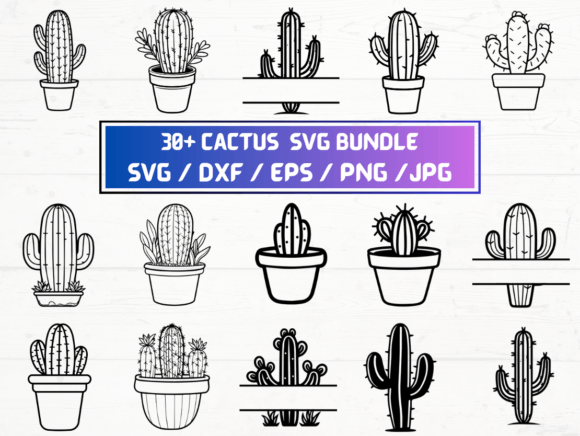
This particular listing offers a curated set of 30 distinct cactus-themed designs delivered as five file formats: SVG, DXF, EPS, PNG, and JPG—all included in a single ZIP folder. Each format serves a specific technical purpose, and the bundle’s uniform count (30 of each) reflects intentional cross-platform compatibility rather than redundancy.
Why Consider a Cactus SVG Bundle?
People explore Cactus SVG files for practical, project-driven reasons—not just aesthetic preference. Common use cases include creating custom apparel (e.g., heat-transfer vinyl on t-shirts), home décor (wood signs, stencils, wall decals), party supplies (cactus-themed invitations or favor tags), or small-batch merchandise (mugs, tote bags, stickers). The cactus motif carries broad appeal across niches: boho interiors, southwestern branding, plant-themed education materials, and minimalist lifestyle products.
Because the designs are pre-made and digitally delivered, users avoid the time and skill investment required to draw original vector art from scratch. That said, value depends less on quantity and more on whether the included styles match intended applications—such as clean line art for cutting, layered illustrations for print-and-cut workflows, or high-resolution transparent PNGs for digital overlays.
Understanding the Included Formats
The bundle includes five widely supported formats, each with distinct strengths:
- SVG: Native to web browsers and compatible with most modern cutting software (Cricut Design Space, Silhouette Studio). Ideal for projects requiring scalable, editable paths.
- DXF: A legacy vector format often used in CAD and older versions of cutting software. Useful for users who need backward compatibility or work with CNC routers.
- EPS: An Adobe Illustrator–friendly vector format that preserves layers and editing capability when opened in professional design tools.
- PNG: Raster files at 300 dpi with transparent backgrounds—suitable for print-on-demand platforms, digital presentations, or watermark-free mockups.
- JPG: Also raster-based but without transparency; best for web previews, social media posts, or situations where background color matters.
No physical item ships—this is strictly a digital download. Buyers receive immediate access after purchase, assuming their payment clears successfully and the platform processes the transaction without delay.
Benefits and Realistic Expectations
The primary benefit of this Cactus SVG collection is convenience: having multiple formats for the same design reduces conversion steps and minimizes compatibility risks. For example, if a user’s cutting machine accepts DXF but not SVG, the bundle eliminates the need to convert files manually—a process that can distort paths or lose layers.
However, convenience doesn’t guarantee suitability. Not all 30 designs will align with every user’s needs. Some may be overly detailed for vinyl cutting, while others might lack the subtle gradients or textures preferred for print design. Since no preview thumbnails or style descriptions accompany the listing details provided, buyers must rely on representative images or seller-provided samples to assess visual consistency, line weight, and negative space—factors critical for successful cutting or printing.
Also, licensing terms matter. Unless explicitly stated otherwise, these files are typically licensed for personal and small-business commercial use—but rarely for resale as standalone digital assets or mass production without modification. Users intending to sell physical items (e.g., printed posters or embroidered patches) should verify usage rights before scaling output.
When This Bundle Is a Strong Fit
This Cactus SVG package suits users who:
- Already own or plan to use cutting machines (Cricut, Silhouette, Brother ScanNCut) and want ready-to-cut desert-themed elements;
- Need consistent design language across multiple output types—e.g., using the same cactus icon for a vinyl decal, a website banner, and a printed brochure;
- Prefer predictable file structure (one-to-one mapping across formats) over curated, context-specific variations;
- Value time savings over bespoke customization and are comfortable selecting from a fixed set rather than commissioning original artwork.
It also supports iterative testing: trying one design in SVG for cutting, then switching to its PNG version for a digital presentation avoids format-switching friction during early-stage prototyping.
When Alternatives May Be Worth Exploring
Users with specialized requirements may find limitations. For instance:
- If you need editable layers (e.g., separate spines, pots, and soil for independent coloring), check whether the EPS or SVG files actually contain grouped or ungrouped elements—some bundles flatten layers to simplify delivery.
- If your workflow relies heavily on color separation for screen printing or multi-color vinyl, confirm whether designs include color-coded layers or require manual separation.
- If you prioritize originality, consider whether 30 generic cactus motifs meet brand-distinction goals—or whether hiring an illustrator for custom SVGs would better support long-term identity.
- If you only need one or two designs—and already have reliable conversion tools—you might spend less by purchasing individual SVGs instead of a full bundle.
Additionally, free or low-cost alternatives exist. Public domain SVG repositories (e.g., OpenPeeps, unDraw) sometimes include cactus icons, though with less variety and no DXF/EPS support. Subscription-based services like Creative Market or The Hungry JPEG offer rotating cactus-themed bundles, sometimes with extended licenses or tutorials—useful for learners building foundational skills.
Making an Informed Decision
Evaluating a Cactus SVG bundle isn’t about counting files—it’s about matching capabilities to intent. Ask yourself:
- Which software or hardware will I use? (Match format support first.)
- What’s my end output? (Cutting requires clean vectors; digital display benefits from high-res PNGs.)
- Do I need flexibility to edit colors, scale, or combine elements—or is plug-and-play sufficient?
- How much time do I have to troubleshoot compatibility versus investing in learning vector-editing basics?
If the answer leans toward immediacy, multi-format reliability, and moderate design variety, this bundle meets those criteria efficiently. If your goals center on uniqueness, scalability across large product lines, or deep integration into branded systems, evaluating custom creation or premium subscription libraries may yield higher long-term utility.
Finally, remember that digital files are tools—not solutions. Their usefulness emerges through application: test one SVG in your cutting software before scaling to all 30; open an EPS in Illustrator to inspect layer integrity; overlay a PNG on a mockup to gauge visual balance. Hands-on verification remains the most reliable way to determine fit.