Food Recipe Planner KDP Interior
If you're building a low- or mid-content business on Amazon KDP, the Food Recipe Planner KDP Interior isn’t just another template—it’s a deliberate leverage point. It’s designed not to fill space, but to solve specific operational and strategic challenges: reducing production time, improving consistency across titles, and accelerating time-to-market without sacrificing quality or compliance. When used intentionally, this interior delivers more than pages—it delivers predictability, scalability, and quiet confidence in your publishing workflow.
What This Interior Actually Is—And Why That Matters
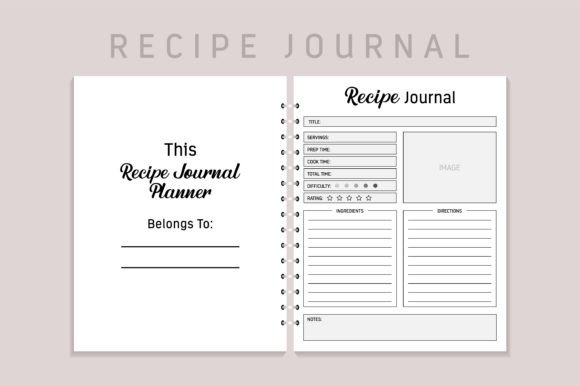
The Food Recipe Planner KDP Interior is a 120-page, 8.5 × 11 inch interior file built specifically for Amazon’s Kindle Direct Publishing platform. It includes a ready-to-upload PDF, an editable EPS source file, high-resolution interiors, and no bleed—meaning no guesswork about margins or trimming. Every page is KDP-tested: it meets Amazon’s formatting standards, passes preview checks, and avoids common rejection triggers like inconsistent spacing, font embedding issues, or incorrect DPI.
This isn’t a generic notebook layout repurposed for recipes. It’s structured with intention: clean section dividers, intuitive weekly planning grids, ingredient tracking spaces, meal prep timelines, and blank recipe cards—all optimized for handwritten or light digital annotation. The design supports usability first, aesthetics second. That distinction matters: readers don’t buy planners for decoration—they buy them for clarity, rhythm, and reduced cognitive load when planning meals.
Strategic Use Cases Beyond “Just Another Planner”
Consider how the Food Recipe Planner KDP Interior functions across different business models:
- For creators launching a niche series: Pair it with a themed cover (e.g., “Mediterranean Meal Prep Planner”) and targeted keywords. Because the interior is pre-validated, you can test multiple niches—keto, vegan, budget cooking—with minimal overhead. Each title shares the same reliable interior; only the branding and metadata shift.
- For educators or nutrition professionals: Use the interior as a foundation for client workbooks. Add your own instructional notes, reflection prompts, or habit trackers in the editable EPS file—then re-export as a branded resource. You’re not starting from scratch each time; you’re iterating with purpose.
- For small publishers scaling output: Batch-create interiors for seasonal releases (e.g., “Fall Harvest Recipe Planner”, “Holiday Baking Companion”). With one tested interior, you cut formatting time by 70–80% per title—freeing mental bandwidth for marketing, customer engagement, or rights expansion.
In each case, the value isn’t in the pages themselves—but in what they enable: faster decisions, tighter alignment between offer and audience need, and fewer surprises at upload.
How to Use It Intentionally—Not Automatically
Having a ready-made interior doesn’t eliminate strategy—it shifts where strategy applies. Before uploading, ask yourself:
- Does this interior match the outcome my ideal buyer wants? A busy parent needs speed and visual simplicity—not ornate borders or excessive blank space. A culinary student may value space for technique notes over aesthetic flourishes. Audit your target reader’s real behavior, not assumptions.
- Is the structure supporting—or undermining—their workflow? Weekly planning grids only help if users actually plan weekly. If your audience cooks daily or batch-preps monthly, consider adding a flexible “prep day” spread in the EPS file before finalizing.
- Where does this fit in my broader content ecosystem? If you also sell cookbooks, meal kits, or video courses, does this planner reinforce those offers? Could a subtle callout on page 2 (“Pair this planner with our 30-Minute Weeknight Dinners cookbook”) deepen engagement without feeling salesy?
Intentional use means editing *with context*, not just replacing placeholder text. The EPS file gives you that flexibility—but only if you pause long enough to decide what deserves emphasis, what should be simplified, and what stays neutral to preserve broad appeal.
Risks of Using It Without Clarity
A ready-to-upload interior reduces friction—but it doesn’t remove responsibility. Common missteps include:
- Assuming “KDP-tested” equals “audience-tested”: Amazon’s system validates technical compliance—not resonance. A beautifully formatted planner will underperform if its layout contradicts how people actually plan meals (e.g., too much space for shopping lists, too little for timing notes).
- Overloading the EPS file without testing impact: Adding logos, quotes, or extra sections sounds like value-add—until it crowds key functionality or slows page-turning in print. Every edit should serve a documented user need, not just brand visibility.
- Treating it as a one-time asset instead of a living tool: Market shifts—like rising interest in zero-waste cooking or AI-assisted meal planning—may require subtle interior updates. Build in review cycles (e.g., quarterly) to assess whether the current version still aligns with search behavior, reviews, and conversion data.
Without grounding in goals, even the most polished Food Recipe Planner KDP Interior becomes shelfware—not a growth lever.
Practical Planning Tips for Long-Term Value
To maximize longevity and ROI, treat this interior as infrastructure—not inventory:
- Start with your weakest link: If cover design slows you down, pair this interior with a simple, repeatable cover template. If keyword research is inconsistent, build a reusable spreadsheet to map terms to interior features (e.g., “meal prep timeline” → “weekly meal planner”, “batch cooking schedule”).
- Document your edits: Keep a changelog for each variant—what changed, why, and what metric you’ll watch (e.g., “Added ‘Leftover Remix’ section on p. 42 to support sustainability angle; monitoring ‘vegan meal planner’ CTR”)
- Use whitespace strategically: The interior’s clean layout isn’t accidental. Resist cramming in more lines or smaller fonts. Readers abandon planners that feel dense—even if they’re technically usable. Prioritize breathing room over density.
- Test one variable at a time: If you’re optimizing for conversions, change only the title subtitle or interior intro text—not both simultaneously. That way, you know what moved the needle.
Why This Fits Into Smarter Business Decisions
At its core, the Food Recipe Planner KDP Interior represents a choice: to invest effort upstream—in preparation, validation, and structure—so downstream execution becomes repeatable, not reactive. It reflects an understanding that sustainable creative businesses aren’t built on volume alone, but on systems that scale *without* diluting clarity or control.
That’s especially true in food-related niches, where trust is earned through reliability (accurate measurements), empathy (realistic time estimates), and respect for the user’s constraints (budget, time, dietary needs). A well-structured interior silently communicates all three—before the first word is read.
So yes, you get a PDF. Yes, it’s 120 pages. Yes, it uploads cleanly. But what you really gain is permission—to focus less on formatting and more on positioning, messaging, and meaningful iteration. To spend energy where it compounds: in understanding your reader, refining your offer, and building assets that earn loyalty—not just downloads.
That’s how a Food Recipe Planner KDP Interior stops being a product—and starts being part of your operating system.