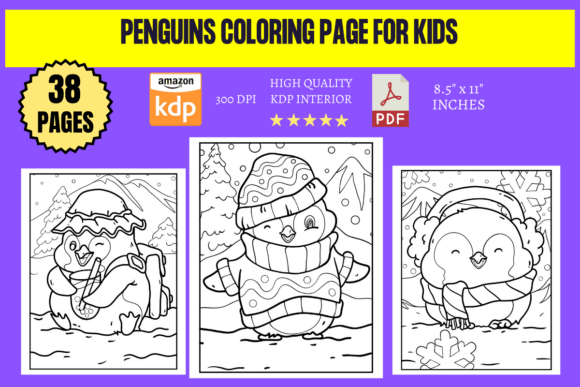
Penguins Coloring Page for Kids
Imagine handing a child a sheet of paper where a penguin waddles confidently across the page—simple lines, expressive eyes, and just enough detail to invite curiosity without overwhelming. That’s the quiet power of a well-designed Penguins Coloring Page for Kids: it’s not just filler activity—it’s an invitation to focus, explore texture, practice fine motor control, and express individuality through color choice and pattern.
This digital collection delivers exactly that—with 50 unique, print-ready designs crafted for real-world use. Each page is sized at 8.5″ x 11″, optimized at 300 DPI, and delivered as both high-resolution JPG and transparent-background PNG files. No cropping, no scaling headaches—just clean, KDP-upload-ready assets you can deploy immediately.
Creative Direction That Scales With Your Intent
What makes this set stand out isn’t just quantity—it’s intentional variation. You’ll find penguins in tuxedo poses, mid-slide on icy slopes, balancing fish on their beaks, peeking from igloos, or grouped in playful colonies. Some pages lean into bold outlines for early learners; others introduce gentle contour shading or subtle background elements (snowflakes, ocean waves, Antarctic silhouettes) for older kids or mixed-age groups.
That diversity opens doors. A homeschooling parent might select three pages with increasing line complexity to scaffold skill development across weeks. A classroom teacher could assign themed weeks—“Penguin Habitats” (pages with icebergs and krill), “Penguin Families” (parent-and-chick pairings), or “Penguin Movement” (jumping, swimming, tobogganing). Each theme builds observational vocabulary while keeping the core activity joyful and tactile.
Practical Uses Beyond the Crayon Box
These aren’t just coloring sheets—they’re modular creative assets. Designers and small business owners regularly repurpose such files in unexpected ways:
- Educational printables: Add labels (“flipper,” “blubber,” “count the eggs”) or turn a penguin outline into a cut-and-paste life-cycle diagram.
- Classroom decor: Print five favorites on cardstock, laminate them, and use as rotating bulletin board features—kids color one per week, then display alongside science facts.
- Digital learning tools: Import PNGs into Canva or Google Slides to layer interactive elements—drag-and-drop color palettes, clickable fun facts, or animated “hatch” sequences.
- Brand-aligned giveaways: A children’s bookstore, nature center, or pediatric clinic can add a custom logo watermark and distribute as branded activity kits—low-cost, high-perceived-value engagement.
The key is consistency in execution: keep fonts legible if adding text, maintain uniform margins when assembling multi-page booklets, and always preview how colors render on home printers before mass distribution.
Adapting for Different Audiences—and Platforms
A single penguin outline transforms depending on who uses it and where:
For educators: Pair pages with short nonfiction passages (e.g., “Why don’t penguins fly?”) and ask students to illustrate one fact from the text. This bridges literacy, comprehension, and visual synthesis—no extra prep needed beyond selecting the right page.
For content creators: Use individual PNGs as consistent visual anchors across blog posts, Pinterest pins, or Instagram carousels. A series titled “5 Penguin Facts + Free Coloring Page” performs well because it offers immediate utility—not just inspiration.
For self-publishers: These 50 pages form the interior of a cohesive, Amazon KDP-ready coloring book in under an hour. Add a simple cover (a friendly penguin waving beside the title), include a one-page intro with usage tips, and publish. No illustration skills required—just smart curation and clear formatting.
Keeping It Original, Organized, and Audience-Friendly
Originality here doesn’t mean reinventing penguins—it means thoughtful sequencing and contextual relevance. Group pages by difficulty (beginner → intermediate → confident colorist), theme (solitary → colony → habitat), or line weight (bold → medium → delicate). That structure helps users navigate intuitively, whether they’re a tired parent at 7 a.m. or a teacher planning next month’s unit.
Organization extends to file naming too. Instead of “page_01.jpg,” name files descriptively: “penguin-sliding-on-ice-bold-outline.jpg.” It saves time during editing, platform uploads, or client handoffs—and signals professionalism to collaborators.
Audience-friendliness means honoring cognitive load. Avoid over-cluttered scenes for younger kids. Skip tiny internal details that frustrate rather than engage. And always test-print one page first: does the line hold up on standard copy paper? Does contrast remain strong after scaling down for digital use? These small checks prevent frustration downstream.
Ideas That Spark Action—Not Just Inspiration
Here are three low-lift, high-impact projects you can start today:
- The “Color & Compare” Kit: Print two versions of the same penguin pose—one with labeled anatomy (beak, flippers, webbed feet), one blank. Kids color both, then discuss differences. Reinforces observation and vocabulary with zero prep.
- Local Library Partnership: Offer a free downloadable “Penguin Week” bundle (5 pages + 3 discussion prompts) to nearby branches. They get fresh programming; you gain authentic backlinks and community visibility.
- KDP Expansion Path: Use 10 pages now as a standalone mini-book. Later, add 10 more themed pages (e.g., “Baby Penguins”), repackage as Volume 2—and cross-promote. Build audience trust incrementally.
None require new illustrations. All rely on how you frame, sequence, and support the existing Penguins Coloring Page for Kids assets.
Ultimately, this collection works because it respects both the child’s need for clarity and the adult’s need for flexibility. It’s not about perfection—it’s about providing reliable, adaptable starting points. Whether you’re designing a lesson, launching a product, or simply making screen-free time feel meaningful again, these 50 pages are ready to serve—not sit unused in a folder. Print one. Share one. Build on one. Then see where the next idea waddles in.